
Description:
Pressing this icon  opens a Window level presets box as seen below. This will allow the user to do the following:
- Place their own window level values and also assign a shortcut key for the window level preset.
- Add their own preset and assign a name, as well as enter window values and assign a shortcut key for the new preset by clicking the button "Add preset".
Once the user is satisfied with the preset window levels, the user must click the "Save presets" button.
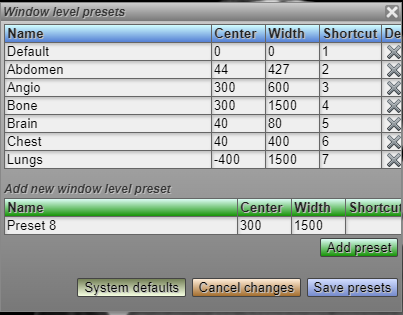
WHAT SHOULD I DO IF THE WINDOW LEVEL KEYBOARD SHORTCUT DOESN'T WORK? 1. Open the window level presets box 2. Make sure that every column has a value3. Then Save presets. or you can, - Press the System defaults - Then save presets
Check out our DSS Page to know more about this feature
https://dpr.lifetrackmedicalsystems.com/decisionsupport/telerad01/V2%20Help/5bb71fb0ab9ee/5b29eed5056ec/5796c7722baf2/578cbe8889b61