
TABLE OF CONTENTS
About
LifeSys sending alerts via SMS is a powerful feature. This is very flexible because it makes use of the worklist. This means that you can set up the worklist with all the conditions and parameters that you want in your alert and just turn on the alerting.
Use case:
- You want to receive an SMS every time a new study is assigned to you for reading. Depending on the workflow, this may be: the study should be in Submitted and that the Case assign field is your initial.
With this, you can create a worklist that displays all the information you want to be in the SMS message: the patient name, patient ID, study description, and other relevant info.
Then filter the worklist to display only studies where Status is Submitted, and the Case assignment initial is you.
Then save that worklist and then follow the steps below to activate it. - Another useful use case is if you want to receive an SMS alert whenever there is a stat or emergency case. For this one, you just need to have a worklist that displays/filters on Emergency status.
Requirement
You need to have a Clickatell account and subscription in order for this feature to work.
Instructions
Step 1. Set up the worklist
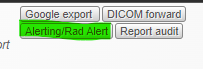
You have to set up an Alerting worklist. The alerting worklist contains all the details you want in your SMS message. Every time a new record is added to that worklist, it will trigger an SMS send when it is activated. Save the worklist then Click the Alerting button on your worklist
Click the Alerting button in your worklist.
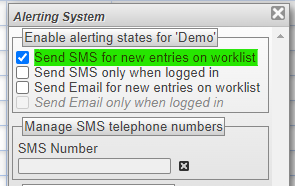
Step 2. Tick the Send SMS for new entries.
You have the option to receive an SMS whenever a new entry is added to the worklist even if you're not logged on, or to receive a message when a new entry is added only when you are logged on to the system
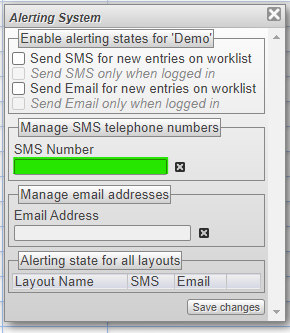
Step 3. Type your mobile number in the box.
A valid mobile number requires a country code followed by the mobile number
Format: +countrycode+mobile number (ie: +612843001111)
Step 4. Then click Save Changes.
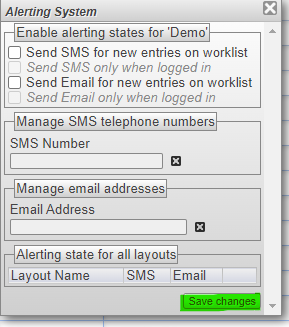
After setting this up, it will now send an SMS whenever a new study is added to the Alerting worklist.
Instructional Video
https://www.youtube.com/watch?v=wnZJZH4WndE
Related Article
Receive email alerts: https://support.lifetrackmed.com/a/solutions/articles/33000273410
If this feature is not in your scope, please contact your PACS Administrator to add this to your account.
If you're still having problems, send a ticket to:
https://support.lifetrackmed.com/support/tickets/new
Include in the ticket the:
- URL you use to view the worklist: ie: xx.lifetrackmed.com
- User ID
- Facility Name (Institution or Site)