
If you’re still using the old Lifetrack gateway, you may need to contact your PACS Administrator and update the application before we stop support to avoid losing service.
To check:
- Look at the user interface of the gateway launched.
- If you still have something that looks like this, contact your PACS Administrator:
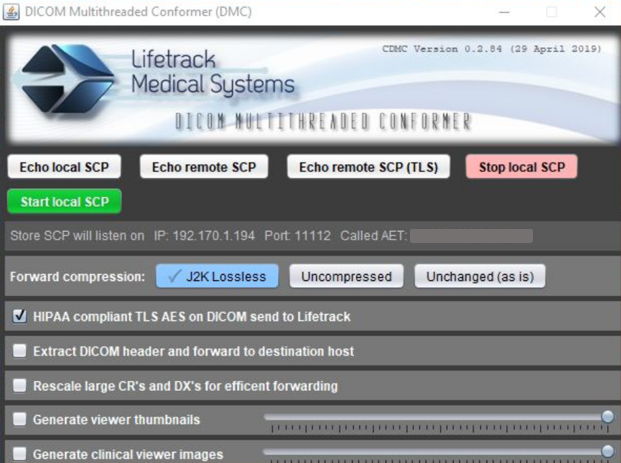
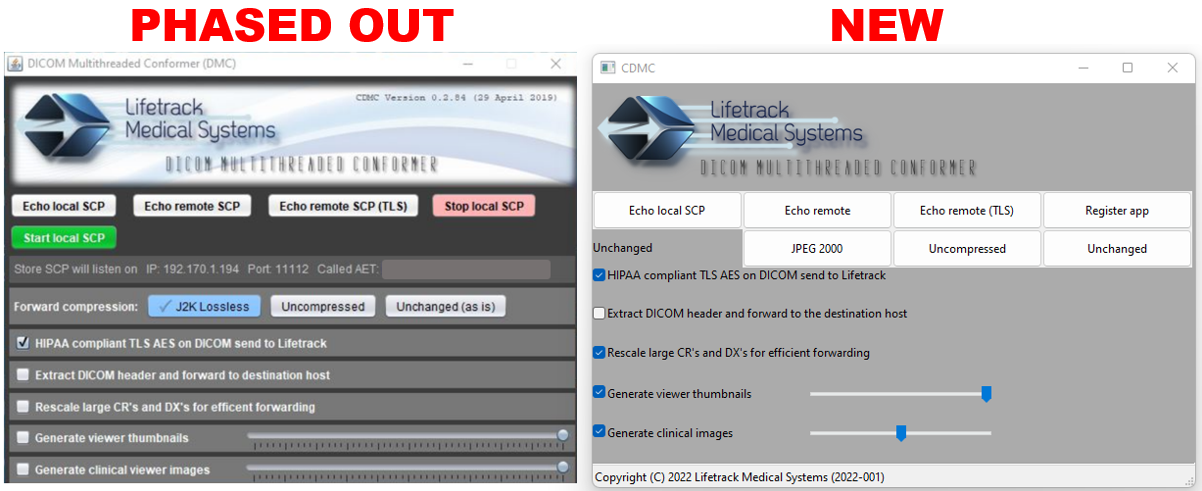
Here’s what’s happening.
Starting dates below, we will stop the support for the mentioned application.
This means that if you’re using the old gateway and are sending to the servers below, and you have the HIPAA-compliant TLS AES on DICOM send to Lifetrack checked, it won’t process the sending
| US server | December 1, 2022 |
| US2 server | |
| US3 server | |
| SG server | |
| SG2 server | |
| SA server | |
| SA2 server |
Here’s what needs to be done.
Download and replace with Lifesys’ new gateway
Contact your PACS Administrator to schedule an update.
Check the network and hardware requirements for the new gateway in this link.
If you are the PACS Administrator, email us at support@lifetrackmed.com with the following information in the email:
- Server URL:
- Site name:
- Facility contact person and email address:
- Update schedule:
Other resources: